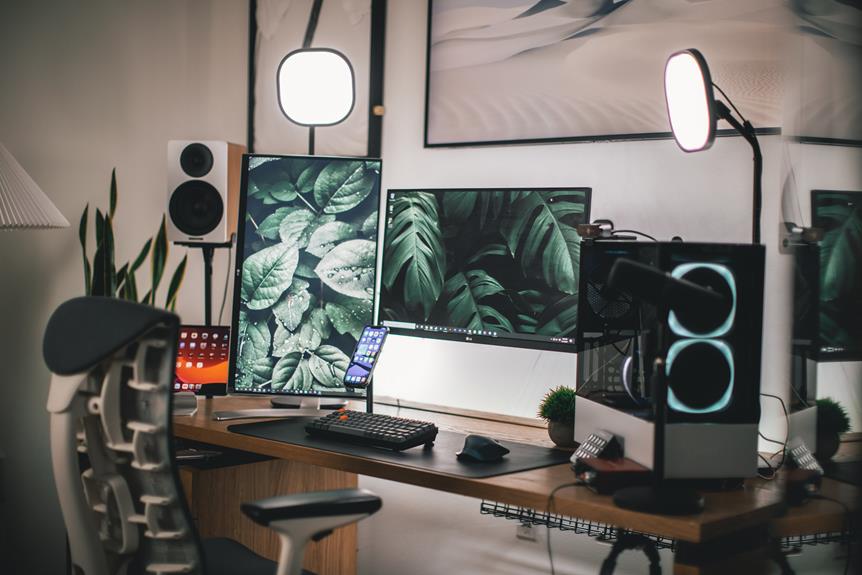
Imagine your home office as a finely tuned instrument, with every detail precisely calibrated to enhance your productivity and well-being.
As you navigate the world of remote work, creating an optimal home office setup becomes crucial for your success.
From ergonomic furniture selection to harnessing natural light, there are numerous strategies to explore.
But how do you know which ones will truly make a difference?
Stay tuned to uncover the essential home office setup tactics that will transform your workspace into a haven of efficiency and comfort.
Key Takeaways
- Invest in ergonomic furniture, such as standing desks, adjustable chairs, and ergonomic keyboards, to improve energy levels, reduce back pain, and increase productivity.
- Maintain a tidy and organized workspace by decluttering regularly, utilizing storage solutions, and implementing effective workspace organization strategies.
- Integrate technology properly by keeping cables organized, positioning the desk for easy access to power outlets and connectivity ports, and adjusting screen placement and settings to reduce strain.
- Maximize natural lighting by positioning windows strategically, using window treatments for privacy, and incorporating reflective surfaces to distribute light evenly. Focus on creating a comfortable environment by choosing an ergonomic chair, optimizing natural lighting, controlling temperature and humidity levels, and ensuring proper support and blood circulation.
Ergonomic Furniture Selection
Are you seeking comfortable and supportive ergonomic furniture for your home office setup? When it comes to creating an ideal workspace, ergonomic furniture is essential for promoting proper posture and reducing the risk of strain and injury. Standing desks offer a range of benefits, including improved energy levels, reduced back pain, and increased productivity. Look for adjustable desk options that allow you to easily switch between sitting and standing throughout the day, providing flexibility and promoting movement.
Proper posture is crucial for long hours spent at a desk. When selecting ergonomic furniture, prioritize chairs that offer lumbar support and adjustable features to ensure proper alignment. Additionally, ergonomic keyboard choices can contribute to a more comfortable and efficient work experience. Consider keyboards that are designed to reduce strain on the wrists and forearms, promoting a more natural hand position while typing.
Investing in ergonomic furniture is an investment in your health and well-being. By choosing standing desks with adjustable options, prioritizing proper posture, and selecting ergonomic keyboard choices, you can create a home office setup that supports your body and enhances your productivity. Take the time to research and test out different options to find the perfect ergonomic furniture that meets your specific needs and preferences.
Your body will thank you for making the effort to prioritize comfort and support in your home office setup.
Effective Workspace Organization
Improve your productivity and comfort by implementing effective workspace organization strategies in your home office.
When it comes to desk organization and clutter management, here are some essential strategies to optimize your workspace:
- Declutter Regularly
Set aside time each week to declutter your desk and surrounding areas. Dispose of any unnecessary items and file away important papers to maintain a tidy workspace.
- Invest in Storage Solutions
Utilize drawer organizers, filing cabinets, and shelves to keep your office supplies, documents, and other materials neatly stored and easily accessible. This will help reduce visual clutter and create a more streamlined work environment.
- Use Cable Management Systems
Tangled cables can't only be unsightly but also pose a tripping hazard. Invest in cable management solutions such as cable clips, zip ties, or cable sleeves to keep your cords organized and out of the way.
Technology Integration Tips
To seamlessly incorporate technology into your home office setup, consider the layout and accessibility of your devices and peripherals. A well-thought-out desk setup and cable management system can make a significant difference in the functionality and aesthetics of your workspace. When it comes to multi-monitor setups, proper screen placement is crucial for an efficient and comfortable working environment. Here are some technology integration tips to optimize your home office:
| Technology Integration Tips | Description |
|---|---|
| Cable Management | Keep cables organized and out of the way to prevent tangling and create a neat workspace. Consider using cable clips, sleeves, or trays to route and hide cables. |
| Desk Setup | Position your desk to allow easy access to power outlets and connectivity ports. Choose a desk with built-in cable management features or use cable organizers to keep wires tidy. |
| Multi-Monitor | If using multiple monitors, ensure that the primary screen is directly in front of you at eye level to reduce neck strain. Secondary monitors should be angled for comfortable viewing without constant head movement. |
| Screen Placement | Position your screens to minimize glare and reflections. Adjust the brightness and contrast settings to reduce eye strain during extended computer use. |
Implementing these technology integration tips will not only enhance the functionality of your home office but also contribute to a more organized and visually appealing workspace.
Maximizing Natural Lighting
Want to make the most of natural light in your home office?
Consider the placement of your windows and how they can best illuminate your workspace throughout the day.
Using reflective surfaces can also help bounce light around the room, brightening up your workspace and reducing the need for artificial lighting.
Window Placement
Maximizing natural lighting in your home office begins with strategic placement of windows to optimize the flow of light throughout the space.
- Natural Light Benefits
- Position windows to allow ample natural light, boosting mood and productivity.
- Consider the direction of sunlight to prevent glare and maximize illumination.
- Utilize window placement to create a well-lit, energizing workspace.
Striking the right balance between natural light benefits and privacy concerns is crucial for your home office. Window treatments like blinds, shades, or curtains can offer privacy without sacrificing the influx of natural light, ensuring a comfortable and productive work environment.
Using Reflective Surfaces
Consider adding reflective surfaces like mirrors or glass tabletops to your home office to help maximize natural lighting and create a brighter, more energizing workspace. Reflective surfaces can significantly reduce glare and distribute natural light more evenly throughout the room. This not only creates a more pleasant working environment but also helps in improving productivity.
By strategically placing mirrors or opting for a glass desk, you can harness the available natural light to its full potential. Additionally, the reflective surfaces can make your space feel more open and spacious.
When choosing reflective surfaces, ensure they're positioned to bounce light effectively without causing any uncomfortable glare on your computer screen or work surfaces. With this simple adjustment, you can enhance your home office setup and make the most of natural lighting.
Creating a Comfortable Environment
Hey there! When it comes to creating a comfortable home office environment, there are a few key factors to consider.
First, make sure you choose an ergonomic chair that provides proper support for your back and helps maintain good posture.
Additionally, optimizing natural lighting and controlling the temperature and humidity of your workspace can significantly enhance your comfort and productivity.
Ergonomic Chair Selection
Selecting an ergonomic chair that supports your body and promotes good posture is crucial for creating a comfortable and productive home office environment. When choosing an ergonomic chair, consider the following key features:
- Lumbar support: Look for a chair that provides adequate support for your lower back to reduce strain and promote proper spine alignment.
- Adjustable armrests: Opt for a chair with adjustable armrests to ensure that your arms are properly supported, helping to alleviate shoulder and neck tension.
- Seat depth and height adjustment: Ensure the chair allows you to adjust the seat depth and height to maintain proper leg positioning and blood circulation.
Natural Lighting Optimization
When setting up your home office for optimal comfort and productivity, ensuring that natural lighting is optimized plays a crucial role in creating a comfortable environment.
Sunlight exposure can positively impact your mood and energy levels, so try to position your desk near a window to maximize natural light.
However, it's essential to manage glare to prevent eye strain and discomfort. Use adjustable blinds or curtains to control the amount of sunlight entering the room.
Additionally, consider using anti-glare screens for your electronic devices to reduce the impact of direct sunlight.
Temperature and Humidity Control
To create a comfortable work environment, it's important to maintain optimal temperature and humidity levels in your home office. Consider these strategies for temperature and humidity control:
- Smart Thermostats: Invest in a smart thermostat to easily regulate the temperature in your workspace, ensuring it's always just right for maximum productivity.
- Air Purification: Enhance air quality with air purifiers that remove allergens, dust, and odors, creating a healthier and more pleasant atmosphere for work.
- Energy Efficient HVAC and Dehumidifier Integration: Opt for energy-efficient HVAC systems and integrate a dehumidifier to combat excessive moisture, preventing mold and creating a more comfortable environment.
Establishing Work-Life Balance
Consider incorporating regular breaks and setting clear boundaries between your work and personal time to establish a healthy work-life balance in your home office setup.
When working from home, it can be challenging to separate work from personal time, leading to burnout and decreased productivity. Implementing effective time management and setting clear boundaries can help you achieve a better work-life balance. Here are some practical strategies to help you manage your time and establish boundaries for a more harmonious work-life balance:
| Time Management | Boundaries Setting |
|---|---|
| Prioritize tasks based on urgency and importance | Designate specific work hours and stick to them |
| Use time blocking to allocate dedicated time for work tasks | Create a designated workspace to mentally separate work from personal life |
| Minimize multitasking to improve focus and efficiency | Communicate your work hours to family members or housemates |
| Take regular breaks to recharge and avoid burnout | Turn off work notifications outside of work hours |
Frequently Asked Questions
How Can I Effectively Manage Distractions While Working From Home?
To effectively manage distractions while working from home, create a dedicated workspace and set boundaries. Minimize distractions by setting specific work hours, using noise-canceling headphones, and taking regular breaks to stay focused and productive.
What Are Some Tips for Staying Physically Active While Working in a Home Office?
To stay physically active while working from home, consider incorporating an ergonomic workspace and taking regular exercise breaks. Standing desks and active workstations can also help you stay moving throughout the day, reducing the sedentary nature of traditional office work.
How Can I Maintain a Professional Appearance During Video Calls and Virtual Meetings?
To maintain a professional appearance during video calls and virtual meetings, wear professional attire and use virtual backgrounds that are clean and appropriate. This will help you present a polished image and create a more focused environment.
What Are Some Strategies for Managing Time and Staying Productive in a Home Office Environment?
To manage time and stay productive in a home office, prioritize tasks, set specific work hours, and take regular breaks to stay focused. Utilize time-blocking, minimize distractions, and establish a consistent routine for optimal productivity strategies.
How Can I Create Boundaries Between My Work and Personal Life When Working From Home?
To maintain balance while working from home, setting boundaries is key. Designate specific work hours, create a separate workspace, and establish clear rules for when work ends and personal time begins. This will help you maintain a healthy work-life balance.