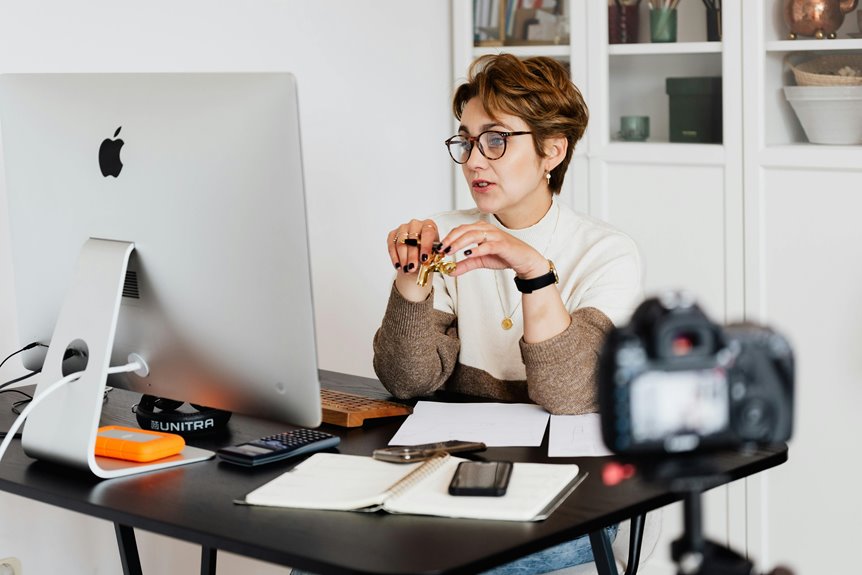
To position your webcam for professional video calls, place it at eye level to create a natural connection with your audience. Choose a clean and uncluttered background that reflects professionalism, avoiding distractions. Use soft, diffused lighting in front of you to enhance visibility, steering clear of harsh overhead lights. Test your setup beforehand to ensure good audio quality and a stable internet connection. There's more to explore about optimizing your virtual presence for better engagement.
Key Takeaways
- Position your webcam at eye level for a natural interaction and to maintain an engaging connection with your audience.
- Choose a clean and organized background that reflects professionalism, avoiding clutter and overly personal items.
- Utilize natural light or soft, diffused lighting in front of you to ensure clear visibility and minimize unflattering shadows.
- Test your webcam angle, lighting, and audio quality prior to meetings to ensure optimal setup and minimize distractions.
- Use an external microphone for better sound quality and consider headphones to reduce echo during video calls.
Understanding the Importance of Webcam Positioning
When you understand the importance of webcam positioning, you can significantly enhance your virtual presence. Proper placement affects how others perceive you, impacting both your professionalism and engagement during calls.
If your webcam's too low or high, it can distort your image and create a disconnect. Positioning it at eye level fosters a more natural interaction, making it easier for others to connect with you.
Additionally, consider your background; a cluttered or distracting space can detract from your message. Good lighting is another factor; it can highlight your features and create a more inviting atmosphere.
Taking the time to set up your webcam correctly shows you value the conversation and the people involved, ensuring a more effective communication experience.
Finding the Optimal Angle for Your Webcam
To get the best results from your webcam, positioning it at eye level is crucial.
This angle not only flatters your appearance but also creates a more engaging connection with your audience.
Don't forget to consider your background, as it can enhance or detract from your overall presentation.
Eye-Level Positioning
Achieving the ideal eye-level positioning for your webcam can significantly enhance your video quality and viewer engagement. When your camera is at eye level, it fosters a more natural interaction, making your conversations feel more personal.
To find that sweet spot, consider these key factors:
| Position | Tips |
|---|---|
| Sitting | Adjust your chair height for direct eye contact. |
| Standing | Use a stable surface to secure the camera at face level. |
| Adjustments | Experiment with angles to see what feels right for you. |
Avoiding Unflattering Angles
While positioning your webcam is crucial for a polished look, finding the optimal angle can make all the difference in how you come across on screen.
To avoid unflattering angles, place your webcam at eye level, ensuring it captures your face straight on. This prevents the dreaded double chin effect and avoids distorting your features.
Tilt your camera slightly downward if you prefer a more dynamic view, but don't go too low; it can make you look disengaged. Experiment with different positions until you find one that highlights your best features.
Background Considerations
Since your background can significantly influence how viewers perceive you, it's essential to choose a setting that reflects professionalism and personality. Aim for a clean, uncluttered space, as distractions can divert attention from your message. Think about the angle of your webcam, too; ideally, it should capture a well-lit area behind you that enhances your appearance.
Here's a quick table to help you decide on background options:
| Background Type | Professionalism Level | Personality Reflection |
|---|---|---|
| Plain Wall | High | Low |
| Bookcase | Medium | Medium |
| Office Setting | High | Medium |
| Nature View | Medium | High |
| Art Display | Low | High |
Choose wisely to make a lasting impression!
Choosing the Right Background for Professionalism
What kind of impression do you want to make during your video calls? Your background plays a crucial role in conveying professionalism.
Choose a clean, uncluttered space that reflects your personality while remaining appropriate for business. Neutral colors or simple patterns can help you stand out without distraction. If you have bookshelves or artwork, ensure they're organized and relevant.
Avoid messy rooms or overly personal items that might detract from your message. Virtual backgrounds can also work, but make sure they look polished and fit the context of your meeting.
Ultimately, your background should enhance your presence and support your professional image, giving viewers confidence in your expertise and focus.
Adjusting Lighting for Clear Visibility
A polished background sets the stage, but lighting is just as important for making a strong impression during video calls.
Natural light is your best friend, so try to position yourself near a window. If that's not possible, use soft, diffused artificial lighting to avoid harsh shadows.
Place the light source in front of you, not behind, to ensure your face is well-lit. Avoid overhead lights, as they can create unflattering shadows.
You might also consider using a ring light for a professional touch. Test different angles and brightness levels to find what works best for you.
Ensuring Proper Eye Level Alignment
To make your video calls more engaging, you need to ensure your webcam is at eye level.
This means adjusting the height and angle of your camera for the best perspective.
Getting this right not only enhances your appearance but also helps you connect better with your audience.
Optimal Height Guidelines
Positioning your webcam at the correct height is crucial for achieving a natural and engaging appearance on camera. Ideally, the camera should be at eye level, which allows for direct communication with your audience.
To find the right height, sit comfortably in your chair and ensure your eyes are aligned with the center of the webcam. If your laptop is too low, consider using a stand or stacking books to elevate it. Conversely, if you're using a desktop, you might need to lower your chair or adjust the monitor.
Camera Angle Importance
The camera angle plays a vital role in how your audience perceives you during video calls. Position your webcam at eye level to create a more engaging and professional appearance. This alignment helps foster a sense of connection, making it feel like you're maintaining eye contact with your audience.
If your camera's too high or low, it can distort your image and distract viewers. To achieve the ideal angle, adjust your chair or use a stand for your webcam. A slight tilt can also enhance your look, but keep it subtle.
Reducing Distractions During Video Calls
One effective way to enhance your video calls is by minimizing distractions in your environment.
First, choose a quiet location away from noise sources like traffic or household activities. Consider using noise-canceling headphones to block out background sounds.
Next, declutter your background; a clean space helps keep the focus on you. If possible, use a plain wall or a virtual background that's professional.
Also, turn off notifications on your devices to avoid interruptions. Make sure your lighting is sufficient so that you're clearly visible, but avoid harsh lights that can cause glare.
Lastly, let others in your home know when you're on a call; this'll help reduce unexpected disruptions.
Testing Your Setup Before Important Meetings
Before diving into an important meeting, testing your setup can save you from potential headaches.
Start by checking your webcam angle and lighting. Make sure your face is well-lit and centered in the frame.
Next, test your audio. Speak a few sentences and listen for clarity and volume. Adjust your microphone settings if needed.
Don't forget to check your internet connection; a stable connection is crucial for smooth communication.
If you're using video conferencing software, run a quick test call with a friend or colleague to ensure everything works seamlessly.
Finally, review your background to confirm it's professional and free of distractions.
With these steps, you'll feel confident and ready for your meeting.
Frequently Asked Questions
How Can I Reduce Glare on My Webcam During Video Calls?
To reduce glare on your webcam, adjust your lighting by using diffused sources or positioning them at an angle. You can also reposition the camera and avoid direct sunlight to achieve clearer visuals.
What Type of Webcam Is Best for Professional Video Calls?
For professional video calls, you'll want a webcam with at least 1080p resolution, good low-light performance, and a built-in microphone. Consider models with autofocus and wider fields of view for better engagement during your calls.
Should I Use a Tripod for My Webcam Setup?
You should definitely consider using a tripod for your webcam setup. It stabilizes your camera, allowing for smoother, clearer video. Plus, you can easily adjust the height and angle to find your best position.
How Do I Manage Background Noise During Video Calls?
To manage background noise during video calls, you can use noise-canceling headphones, close windows and doors, and choose a quiet space. Also, consider muting yourself when you're not speaking to minimize distractions.
Can I Use My Smartphone as a Webcam?
Yes, you can use your smartphone as a webcam! Just download the right app, connect it to your computer, and adjust the camera settings. It'll give you great video quality for your calls.