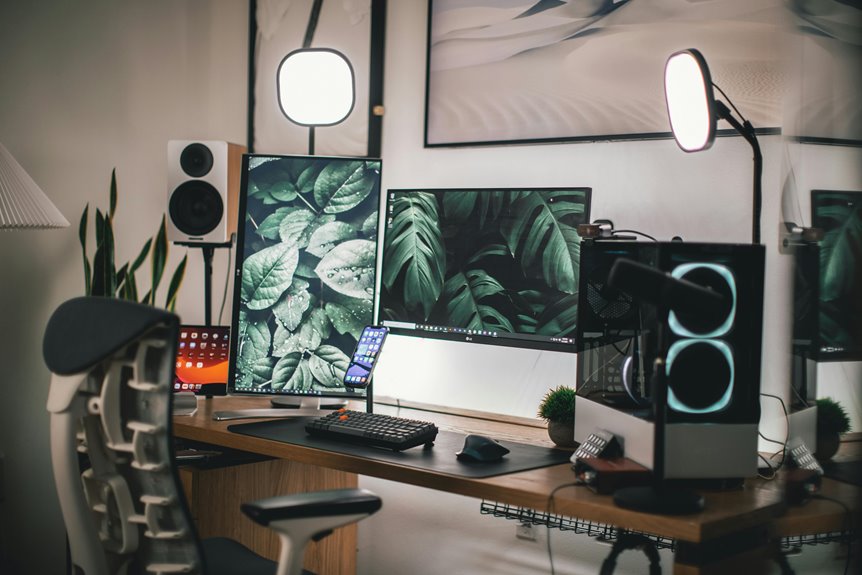
For using a vertical mouse, your desk height should let your elbows rest at a 90-degree angle with forearms parallel to the ground. Aim for your chair height to guarantee your feet are flat on the floor and knees slightly below hip level for ideal comfort. This setup not only supports good posture but also promotes productivity. Adjusting your monitor position and considering arm and wrist positioning can further enhance your ergonomic experience. There’s more to explore on achieving the best workspace!
Key Takeaways
- Desk height should allow elbows to be at a 90-degree angle, ensuring forearms are parallel to the ground for vertical mouse use.
- Chair height must enable feet to rest flat on the floor, with knees slightly below hip level for optimal comfort.
- Monitor should be positioned at or just below eye level, about an arm’s length away, to reduce neck strain.
- Adjust chair backrest to support the lower back, promoting healthy posture while using the vertical mouse.
- Regular breaks every 30-60 minutes are essential to alleviate muscle tension and improve overall productivity.
Understanding the Importance of Ergonomics
When you think about your workspace, it’s easy to overlook how important ergonomics really is. Proper ergonomics can greatly improve your comfort and productivity.
If your desk and chair aren’t the right height, you might find yourself slouching or straining, leading to discomfort and fatigue. By investing time in ergonomic adjustments, you can prevent long-term health issues, such as repetitive strain injuries or chronic pain.
A well-set workspace encourages good posture, allowing your muscles to relax while you work. Plus, when you’re comfortable, your focus and efficiency increase.
Assessing Your Current Workspace Setup
To create an ergonomic workspace, start by evaluating your desk height to guarantee it’s suitable for your vertical mouse.
Next, check your chair adjustment for proper support and comfort.
Finally, analyze your monitor position to prevent strain on your neck and eyes.
Evaluate Desk Height
Evaluating your desk height is essential for ensuring a comfortable and effective workspace, especially if you’re using a vertical mouse.
Start by sitting in your chair with your feet flat on the ground and your knees at a right angle. Your elbows should rest comfortably at your sides, forming a 90-degree angle when you reach for your mouse.
If your desk is too high, you might find yourself raising your shoulders, which can lead to tension and discomfort. Conversely, if it’s too low, you may bend your wrists awkwardly.
Ideally, your desk height should allow your arms to remain parallel to the floor, promoting a natural and relaxed posture while you work.
Make adjustments as needed for maximum comfort.
Check Chair Adjustment
While evaluating your workspace setup, checking your chair adjustment is essential for achieving ideal comfort and support.
A well-adjusted chair can greatly impact your posture and overall health while using a vertical mouse. Here are some key adjustments to take into account:
- Seat Height: Your feet should rest flat on the floor or on a footrest.
- Backrest: Adjust the backrest to support your lower back and promote an upright posture.
- Armrests: Set the armrests so your shoulders relax, and your elbows stay close to your body.
- Tilt Angle: A slight recline can alleviate pressure on your spine, enhancing comfort during long periods of work.
Make these adjustments to create a workspace that supports your well-being and productivity.
Analyze Monitor Position
Since your monitor position plays an essential role in your overall comfort and productivity, it’s important to assess its height and distance from your seating area.
Ideally, the top of your screen should be at or just below eye level, allowing you to maintain a neutral neck position while you work. Sit comfortably in your chair and adjust the monitor so that you can view the screen without tilting your head up or down.
Next, verify your monitor is about an arm’s length away. This distance minimizes eye strain and allows for easy reading.
If you find yourself leaning forward or squinting, it’s time to make adjustments. A well-placed monitor can markedly enhance your workspace ergonomics and overall wellbeing.
Ideal Desk Height for Vertical Mouse Use
When using a vertical mouse, having the right desk height is essential for comfort and efficiency.
An ideal desk height allows your arms to rest comfortably while reducing strain on your wrists.
If your desk is adjustable, you can easily customize it to fit your needs and promote better posture.
Optimal Desk Height
To guarantee comfortable and effective use of a vertical mouse, it’s crucial to choose the right desk height. Ideally, your desk should allow your elbows to rest at a 90-degree angle or slightly obtuse while using the mouse. This position reduces strain on your wrists and shoulders, enhancing your overall experience.
Consider these tips for ideal desk height:
- Your forearms should be parallel to the ground.
- The desk height should accommodate your chair height.
- Adjust the desk so your wrists stay neutral when using the mouse.
- Test different heights to find what feels most comfortable for you.
Selecting the right desk height can make a significant difference in your comfort and productivity while using a vertical mouse.
Adjustable Height Benefits
While many desks come in fixed heights, adjustable desks offer significant benefits for vertical mouse users. You can easily customize the height to suit your specific needs, ensuring ideal comfort and reducing strain on your wrists and shoulders.
When your desk is at the right height, it allows your arm to rest naturally, which can enhance your precision and control while using a vertical mouse. This flexibility helps accommodate different tasks, whether you’re typing, editing, or browsing.
Plus, switching between sitting and standing can improve circulation and energy levels throughout your workday. Ultimately, an adjustable desk empowers you to create a personalized workspace that promotes better posture and productivity.
Recommended Chair Height for Comfort
Finding the right chair height is essential for comfort and productivity. A well-adjusted chair allows you to maintain a healthy posture while using your vertical mouse.
Here are some key points to take into account when setting your chair height:
- Your feet should rest flat on the floor or on a footrest.
- Your knees should be at or slightly below hip level.
- Your arms should rest comfortably on the desk, forming a 90-degree angle at the elbows.
- The chair’s backrest should support your lower back for added comfort.
Adjusting Your Monitor Position
Properly adjusting your monitor position is essential for reducing strain on your neck and eyes as you work with a vertical mouse.
Start by placing your monitor at eye level. This way, you won’t have to tilt your head up or down, which can lead to discomfort. The top of the screen should be at or just below your eye line.
Also, position the monitor about an arm’s length away. This distance helps minimize eye strain and allows you to see the screen clearly without leaning forward. If you wear glasses, make sure to account for that distance.
Finally, tilt the screen slightly back to reduce glare from overhead lights, making it easier on your eyes while you work.
Arm and Wrist Positioning for Optimal Use
With your monitor positioned correctly, it’s time to focus on how your arms and wrists interact with the vertical mouse. Proper positioning can help reduce strain and enhance your overall experience.
Here’s how to keep your arms and wrists in the right position:
- Keep your elbows close to your body, forming an angle between 90 and 110 degrees.
- Rest your wrists on the desk or a soft surface, avoiding any harsh angles.
- Align your forearm parallel to the ground, ensuring a natural posture.
- Use your whole arm to move the mouse instead of just your wrist, allowing for smoother movements.
Benefits of a Properly Set Up Workspace
Creating a workspace that’s set up correctly not only boosts your productivity but also greatly enhances your comfort. When your desk and chair are at the right heights, you can maintain good posture, reducing strain on your back and neck. This setup allows you to work longer without fatigue, keeping your focus sharp.
A well-organized workspace minimizes distractions, helping you stay on task and complete your work efficiently. Additionally, having everything within easy reach reduces unnecessary movements, further increasing your efficiency.
Tips for Maintaining Ergonomic Practices
To maintain ergonomic practices effectively, regularly assess your workspace and make adjustments as needed. Your comfort and health depend on it!
Here are some tips to help you stay on track:
- Adjust your chair height so your feet rest flat on the floor, with your knees at a 90-degree angle.
- Position your desk so that your elbows are at a right angle while typing, keeping your wrists straight.
- Take regular breaks to stretch and change your position every 30-60 minutes.
- Use a vertical mouse to reduce strain on your wrist and improve your hand posture.
Frequently Asked Questions
How Do I Know if My Vertical Mouse Is the Right Size?
Finding the right size for your vertical mouse is like finding the perfect pair of shoes. If it fits comfortably in your hand, allows fluid movement, and reduces strain, you’ve likely found the right one.
Can a Standing Desk Affect My Vertical Mouse Usage?
Using a standing desk can definitely affect your vertical mouse usage. You’ll want to guarantee your desk height allows your arm to stay relaxed, preventing strain and promoting ergonomic positioning for better comfort and efficiency.
What Materials Are Best for Ergonomic Desk Surfaces?
You might think a shiny glass surface is perfect for ergonomics, but it’s not. Opt for materials like wood or bamboo; they’re softer, provide better grip, and promote comfort during long hours at your desk.
How Often Should I Take Breaks While Using a Vertical Mouse?
You should take breaks every 30 to 60 minutes while using a vertical mouse. Stand up, stretch, and walk around to keep your muscles relaxed and reduce the risk of strain or discomfort.
Are There Specific Exercises to Relieve Tension From Vertical Mouse Use?
Using a vertical mouse can feel like you’re dancing with tension. To relieve it, try wrist stretches, shoulder rolls, and finger flexes. These exercises keep your body loose and ready for your next computing session.