
To fix your posture at your desk, start by evaluating your workspace setup. Make sure your chair supports your lumbar region and your elbows rest at a 90-degree angle. Position your monitor at eye level, about an arm's length away. Keep your feet flat on the floor and your knees parallel to the ground. Regularly check your posture and take movement breaks to refresh your body. There's more to learn about maintaining proper alignment and enhancing comfort throughout your day.
Key Takeaways
- Adjust your chair height so your feet rest flat on the floor and knees are at a 90-degree angle.
- Position your monitor at or slightly below eye level and an arm's length away to reduce neck strain.
- Sit with your back against the chair, ensuring proper lumbar support to maintain the natural curve of your spine.
- Keep your elbows at a 90-degree angle while using a keyboard and mouse, ensuring they are close to your body.
- Take regular movement breaks every hour to stretch and refresh your body, enhancing comfort and productivity.
Understanding the Importance of Good Posture

Good posture is essential for your overall health and well-being, as it greatly impacts both your physical and mental state.
Good posture is crucial for your health, influencing both your physical comfort and mental clarity.
When you maintain good posture, you reduce muscle strain and tension, helping you feel more balanced and stable. It also improves your respiration by easing pressure on your diaphragm, allowing for increased lung capacity and easier breathing. Additionally, maintaining correct alignment of spine helps to prevent muscle imbalances that can lead to fatigue and pain.
On the flip side, poor posture can lead to neck, back, and shoulder pain, increasing your risk of injuries and causing fatigue.
Mentally, good posture boosts self-confidence and reduces stress, enhancing your mood. By aligning your body properly, you'll not only feel better physically but also enjoy a more positive mindset, making it vital to prioritize your posture throughout the day.
Evaluating Your Current Workspace Setup
To start improving your posture, you need to assess your desk height and chair support. Make sure your desk allows for your elbows to stay at a 90° angle while typing, and check that your chair provides proper lumbar support. A few simple adjustments can make a significant difference in how you feel throughout the day. Proper posture promotes productivity and efficiency, making it essential to evaluate your workspace setup regularly.
Assess Desk Height
Evaluating your desk height is essential for maintaining a comfortable and ergonomic workspace. Ideally, your desk should allow your elbows to rest at a 90-degree angle, with the surface at or slightly below elbow height. Most standard desks fall between 28 and 30 inches, which suits individuals around 5 feet 10 inches or taller. If you're shorter, consider using a footrest to keep your feet flat and maintain proper posture. If your desk height doesn't feel right, adjustable desks are highly recommended, as they accommodate different heights and preferences. Desk height calculators offer reliable baseline measurements for comfort and efficiency.
Check Chair Support
Chair support plays an essential role in your overall comfort and posture while working at your desk. An ergonomic chair helps maintain natural body alignment, reducing muscle strain. Make sure your chair has proper lumbar support to keep your spine's natural curve, which can alleviate lower back pain. Adjust the seat height so your feet rest flat on the floor and your knees form a 90-degree angle. The backrest should align with your spine's curve, while adjustable armrests should support your arms at a relaxed level. Consider features like a slight forward tilt to encourage an upright posture and breathable materials for comfort. Good postures can significantly enhance your productivity and overall well-being while working. Finally, explore options like lumbar cushions or adjustable footrests to enhance support further.
Choosing the Right Chair for Support
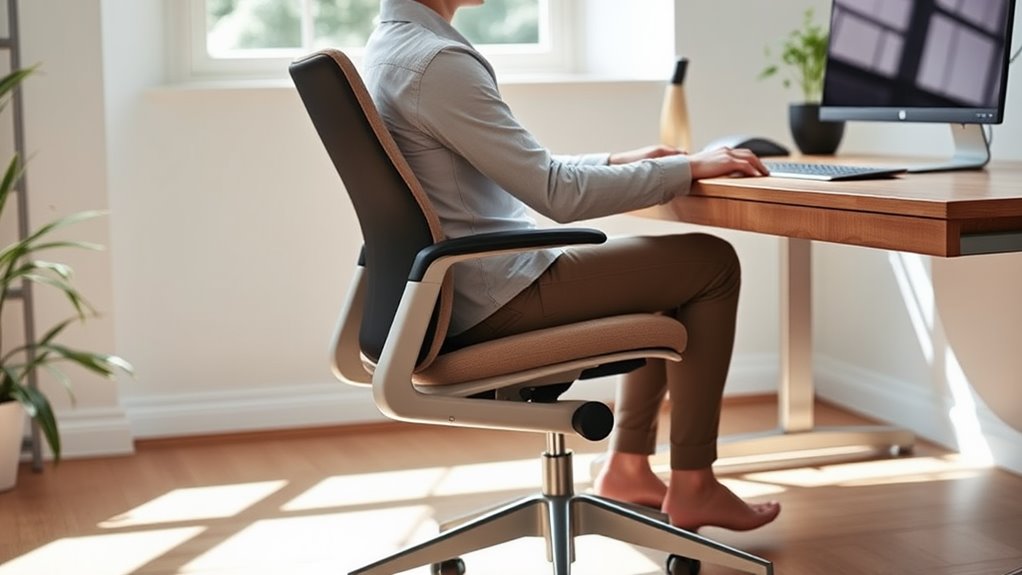
When choosing a chair, focus on lumbar support and adjustability to keep your spine aligned and comfortable. You'll want a chair that lets you easily adjust the height, backrest, and armrests to fit your body perfectly. Prioritizing comfort with these features can greatly enhance your posture and productivity throughout the day. Investing in a chair with ergonomic design can further promote natural body alignment and reduce the risk of future spinal issues.
Importance of Lumbar Support
Choosing the right office chair is essential for maintaining your lumbar health. Proper lumbar support keeps your spine aligned and reduces the risk of back pain. It prevents muscle strain and allows you to stay comfortable during long work hours, boosting your productivity. Here's a quick reference to understand the key benefits of lumbar support:
| Benefits | Details |
|---|---|
| Spinal Alignment | Maintains the natural curve of your spine. |
| Reduced Muscle Strain | Alleviates pressure on muscles and discs. |
| Improved Comfort | Enhances sitting experience, reducing fatigue. |
| Prevention of Back Pain | Lowers the risk of chronic back issues. |
| Increased Productivity | Minimizes discomfort, allowing better focus. |
Investing in a chair with adequate lumbar support is vital for your long-term health. Adjustable lumbar support is crucial for ensuring that the chair fits the unique contours of your body.
Adjustability and Comfort Factors
How can you guarantee your office chair provides the best support for your posture?
Start by choosing a chair with adjustable seat height, ideally between 16 to 21 inches. This guarantees your feet rest flat on the floor.
Look for a backrest that adjusts in height and angle to follow your spine's natural curve. Essential lumbar support is crucial for maintaining proper alignment and preventing discomfort.
Adjustable armrests are essential too, allowing your arms to sit comfortably without straining your shoulders.
Opt for breathable materials to enhance comfort during long hours and guarantee adequate padding for support.
A five-pedestal base adds stability, while a swivel mechanism helps you reach different areas easily.
Prioritize these adjustability and comfort factors to keep your posture in check and enhance your overall well-being.
Positioning Your Monitor and Input Devices
To guarantee your workspace supports good posture, it's essential to position your monitor and input devices correctly.
Start by placing the top of your monitor at or slightly below eye level, making sure it's directly in front of you to avoid twisting your neck. Keep it at least an arm's length away to reduce eye strain. Proper alignment prevents neck and head strain, contributing to a more comfortable work environment.
To minimize glare, adjust the monitor angle and position it perpendicular to windows.
For input devices, use an external keyboard and mouse, keeping the mouse close to your body. Adjust the keyboard height so your hands rest at or slightly below elbow level.
- Make sure the monitor allows a slight downward gaze.
- Tilt the monitor to reduce reflections.
- Position the keyboard and mouse on the same surface.
Maintaining Neutral Posture Throughout the Day
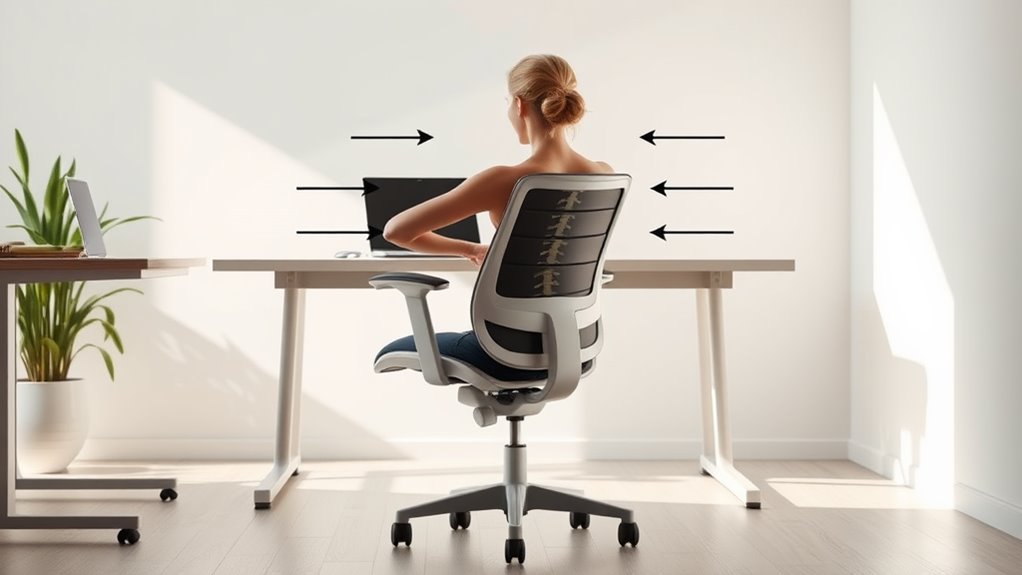
While you may not realize it, maintaining a neutral posture throughout the day is essential for your overall health and comfort.
Sit with your buttocks against the back of your chair, ensuring your pelvis is neutral to prevent tilting. Keep your ears, shoulders, and hips aligned to support your spine's natural curves. Your knees and hips should be at similar heights, reducing back strain. Proper posture helps keep bones and joints aligned for efficient muscle use.
Use lumbar support to maintain the curve in your lower back, and make sure your feet rest flat on the floor for balance.
Consider an ergonomic chair with an S-shaped back and an adjustable desk that allows your forearms to rest parallel to the floor. These adjustments can greatly improve your posture and overall well-being.
Incorporating Movement Breaks Into Your Routine
Incorporating movement breaks into your routine can greatly enhance your overall well-being, especially if you spend long hours at your desk. These breaks not only reduce sedentary behavior but also boost your energy levels and improve cognitive function. By taking just a few minutes to move, you can combat mental fatigue and support your emotional well-being. Frequent breaks can lead to greater post-break performance and help you feel more productive throughout the day.
Consider these effective exercise options during your breaks:
- Squats or lunges to engage your leg muscles.
- Desk stretches, like neck rolls and shoulder stretches.
- Short walks to increase your overall activity level.
Aim to take a break every hour, even if it's just for five minutes.
Your body and mind will thank you for those invigorating pauses throughout the day!
Implementing Ergonomic Practices for Long-Term Benefits
Implementing ergonomic practices at your desk not only enhances comfort but also protects your long-term health.
Start by adjusting your chair and desk height so your feet are flat on the floor, thighs parallel, and elbows bent at 90 degrees. If your chair's too high, use a footrest.
Position your monitor at arm's length, with the top at or slightly below eye level. Elevate your laptop with a stand to reduce neck strain.
Keep your keyboard and mouse close, allowing movement from your elbows. Support your spine's natural curve with proper chair adjustments, and relax your shoulders. Security measures are in place to protect against online attacks, which highlights the importance of maintaining a safe and comfortable workspace.
Finally, maintain alignment by keeping your head over your spine and avoiding crossed legs. These changes can lead to lasting benefits.
Frequently Asked Questions
How Often Should I Reassess My Posture and Workspace Setup?
You should reassess your posture and workspace setup every few months. Regular check-ins help prevent discomfort and enhance productivity, ensuring your workspace remains ergonomic and tailored to your needs for maximum comfort and performance.
What Are the Signs of Poor Posture to Watch For?
You should watch for signs like neck pain, rounded shoulders, and a hunched back. Tension headaches and muscle fatigue can also indicate poor posture, so pay attention to how your body feels throughout the day.
Can Posture Affect My Mood and Productivity?
Yes, your posture can considerably affect your mood and productivity. Sitting upright boosts your confidence and energy, while slouching can trigger negative thoughts, leading to decreased efficiency and overall well-being throughout your day.
Are There Specific Exercises to Strengthen Posture-Related Muscles?
Yes, you can strengthen posture-related muscles with exercises like chest stretches, glute bridges, and bird dogs. Incorporating these into your routine will enhance core stability and improve your overall posture, boosting your mood and productivity.
How Long Should I Take Breaks to Improve Posture Effectively?
To improve your posture effectively, take breaks every 30 to 60 minutes. Use these moments to stretch, move around, or do posture-correcting exercises. This helps reduce strain and enhances your overall focus and productivity.