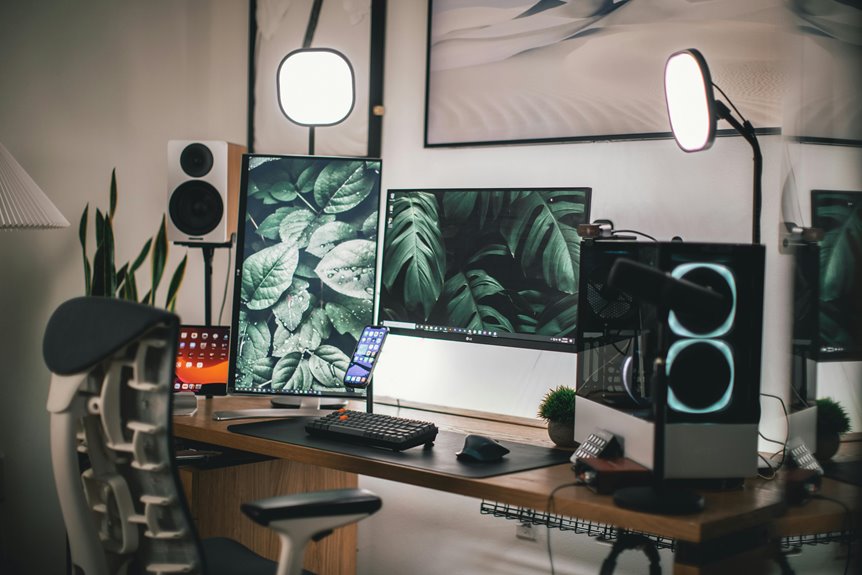
To get the best audio quality for gaming in your home office, position your microphone 6 to 12 inches from your mouth and angle it towards your voice. This setup enhances clarity and minimizes background noise, ensuring your teammates hear you perfectly. Don’t forget to contemplate using pop filters and shock mounts to further reduce unwanted sounds. There’s so much more to perfecting your microphone setup that can elevate your gaming experience.
Key Takeaways
- Position the microphone 6 to 12 inches away from your mouth for optimal sound clarity and voice capture.
- Angle the mic towards your mouth to enhance vocal clarity and minimize background noise.
- Test different distances and angles to find the best sound quality for your specific gaming environment.
- Use a pop filter to reduce plosive sounds and maintain clear audio during gameplay.
- Regularly adjust and test your mic setup based on feedback from friends during voice chats.
Understanding Microphone Types for Gaming
When it comes to gaming, choosing the right microphone type can considerably impact your experience. You’ll find various options, including dynamic, condenser, and lavalier microphones.
Dynamic mics are great for noisy environments, as they pick up sound primarily from the front, minimizing background noise. Condenser mics, on the other hand, capture a broader frequency range and are ideal for voice clarity, making them perfect for streaming or recording.
Dynamic mics excel in noisy settings, while condenser mics enhance voice clarity for streaming and recording.
Lavalier mics are small, clip-on microphones that offer hands-free convenience, but they may not deliver the same sound quality as the other two types.
Consider your gaming setup, budget, and whether you prioritize sound quality or convenience. Your choice will ultimately enhance your communication and overall gameplay experience.
The Importance of Mic Positioning
Mic positioning is essential for enhancing your gaming experience.
By optimizing sound quality and employing noise reduction techniques, you can guarantee clear communication with teammates.
Plus, finding a comfortable and accessible setup will keep you focused on the game, not adjusting your gear.
Sound Quality Optimization
Although many gamers focus on their headset or soundcard, the positioning of your microphone plays an essential role in sound quality.
Placing your mic too far away can result in weak audio, while positioning it too close might cause distortion. Ideally, you want your mic about 6 to 12 inches from your mouth. This distance helps capture your voice clearly without overwhelming the recording.
Additionally, angling the mic slightly towards your mouth can enhance vocal clarity. Experiment with different heights and angles to find what works best for you.
Remember, a well-placed microphone can greatly improve your gaming experience, making your voice sound more professional during streams or online play.
Optimize your setup to guarantee your voice shines through.
Noise Reduction Techniques
Proper microphone positioning can make all the difference in reducing unwanted noise during your gaming sessions. Placing your mic too far from your mouth can pick up background sounds, while positioning it too close might cause distortion. Aim for a distance of 6-12 inches from your mouth, slightly off-axis to minimize plosive sounds.
Here’s a quick guide to effective noise reduction techniques:
| Technique | Description |
|---|---|
| Use a pop filter | Reduces plosive sounds |
| Positioning angle | Tilt mic slightly away from mouth |
| Acoustic treatment | Add soft materials in the room |
| Background noise control | Mute devices or close windows |
| Monitor mic gain | Adjust gain to avoid clipping |
Comfort and Accessibility
Finding the right microphone position is essential for both comfort and accessibility during gaming. If your mic’s too far away, you’ll strain your voice, leading to fatigue during those marathon sessions. Place it close enough so you can speak naturally without leaning forward or adjusting constantly.
You want it at an angle that captures your voice clearly but doesn’t obstruct your view of the screen. This way, you can maintain focus on your game without distractions.
Also, consider your gaming setup. If you’re using a headset, a boom mic mightn’t be practical.
Adjusting the mic height and distance can make a big difference in your overall gaming experience, enhancing communication with teammates and ensuring you stay comfortable throughout your playtime.
Ideal Distance From Mouth
Finding the right distance between your mouth and the microphone is essential for clear audio.
Ideally, you should aim for a range that guarantees consistent sound quality without overwhelming the mic. This balance helps you sound your best during those intense gaming sessions.
Optimal Distance Range
The ideal distance for your microphone from your mouth typically falls between 6 to 12 inches. This range helps capture your voice clearly while minimizing background noise.
If you’re too close, your breath sounds might overpower your voice; too far, and you risk losing clarity.
Here are three tips to find the right spot:
- Test Your Setup: Speak normally while adjusting the distance until you find the sweet spot where your voice sounds natural and clear.
- Monitor Sound Levels: Use your software to verify your voice isn’t peaking or too quiet.
- Consider Your Environment: Factors like room size and acoustics can affect how well your microphone picks up sound, so adjust accordingly.
Consistent Sound Quality
Maintaining a consistent sound quality is essential for gaming, especially during intense sessions where communication is key. To achieve this, keep your microphone about 6 to 8 inches from your mouth. This distance helps capture your voice clearly while minimizing background noise.
If you’re too close, you risk overwhelming the mic with plosives, while being too far away can lead to a muffled sound.
Make certain you’re speaking directly into the microphone to maintain clarity. Experiment with angles, as slight adjustments can enhance your voice’s presence.
Also, consider using a pop filter to further improve sound quality. By finding that sweet spot, you’ll guarantee your teammates hear you loud and clear, enhancing your gaming experience.
Angle of the Microphone
Positioning your microphone at the right angle can make a significant difference in audio quality during gaming sessions.
To optimize your setup, consider these key points:
- Aim for Direct Sound: Position the microphone so it faces your mouth directly. This helps capture your voice clearly, minimizing distortion.
- Tilt Slightly Downward: An angle that slightly tilts downward can prevent breath sounds and plosives, ensuring a cleaner recording.
- Adjust Distance: Maintain a distance of about 6-12 inches from your mouth. This balance helps with volume without overwhelming the mic.
Minimizing Background Noise
Background noise can be a real nuisance during gaming sessions, distracting both you and your teammates. To minimize this annoyance, start by choosing a quiet space for your setup.
Close windows and doors to block out external sounds. You might also want to use rugs or curtains to absorb sound within the room.
Position your microphone closer to your mouth while keeping it away from noise sources like fans or computers. Consider using directional microphones, as they pick up sound from one direction and reduce background noise.
Position your microphone near your mouth and steer clear of noise sources for clearer audio during gaming.
Finally, if possible, schedule your gaming sessions during quieter times when household activity is minimal.
These simple adjustments can greatly enhance audio quality and improve your gaming experience.
Using Pop Filters and Shock Mounts
To further enhance your audio quality while gaming, incorporating pop filters and shock mounts can make a significant difference.
These tools help you achieve clearer sound and minimize unwanted noise, allowing your voice to shine through.
Here are three benefits of using pop filters and shock mounts:
- Pop Filters: They reduce plosive sounds (like “p” and “b”) that can distort your audio, ensuring a cleaner recording.
- Shock Mounts: By isolating your microphone from vibrations and handling noise, shock mounts keep your sound crisp and professional.
- Overall Clarity: Together, these tools help create a more polished audio experience, which is essential for immersive gaming and effective communication.
Investing in them will elevate your gaming audio to the next level.
Testing and Adjusting Your Setup
Testing your microphone setup is essential to guarantee ideal audio quality during gaming sessions. Start by recording your voice at different distances and angles from the microphone. This helps you determine the best position for clarity and volume.
Play back the recordings and listen for background noise or distortion. Adjust the gain levels on your audio interface to avoid clipping while ensuring your voice is clear.
Don’t forget to test in your actual gaming environment, as background sounds can vary. Experiment with different pop filters and shock mounts to see how they affect sound quality.
Finally, ask a friend to join a voice chat to get real-time feedback on your audio quality. Make adjustments as necessary, and you’ll enhance your gaming experience.
Frequently Asked Questions
Can I Use a Headset Microphone for Gaming?
Yes, you can use a headset microphone for gaming. It provides convenience and clarity, allowing you to communicate easily with teammates. Just make sure it’s comfortable and positioned correctly for the best sound quality.
What Is the Difference Between USB and XLR Microphones?
USB microphones connect directly to your computer, making them user-friendly and portable. XLR microphones require an audio interface for higher sound quality and versatility, but they’re often bulkier and more complex to set up.
How Do I Know if My Microphone Is Working Properly?
To check if your microphone’s working properly, test it by speaking into it while monitoring audio levels in your recording software or communication app. Adjust settings if necessary, and verify your device drivers are up to date.
Can Microphone Positioning Affect Voice Clarity During Streaming?
Yes, microphone positioning markedly affects voice clarity during streaming. If you place it too far away or at an awkward angle, your voice may sound muffled. Experiment with different positions to find what works best for you.
Are There Specific Microphones Recommended for Console Gaming?
For console gaming, you’ll want a dynamic microphone like the Shure SM7B or a USB option like the Blue Yeti. Both deliver excellent sound quality and clarity, enhancing your gaming experience and communication with teammates.