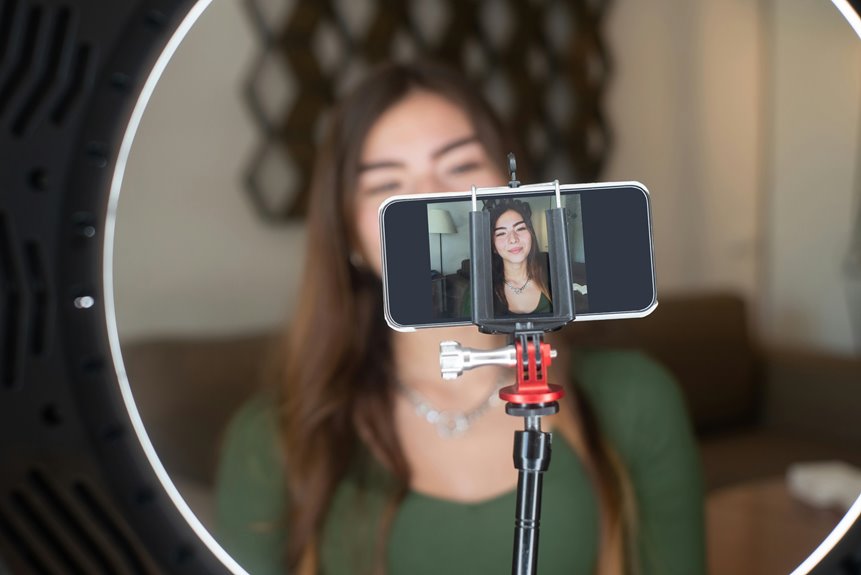
To achieve minimum viable lighting for a quick, unplanned video call, position yourself near a window to take advantage of natural light. Confirm the light faces you, avoiding direct sunlight that can create harsh shadows. If natural light isn’t available, use a soft desk lamp aimed slightly downward for a flattering effect. Be certain to test your setup by checking your camera angle and lighting. There’s more to explore about effective lighting techniques for video calls.
Key Takeaways
- Position yourself near a window to utilize natural light, ideally facing it for a soft glow.
- Avoid harsh overhead lights that create unflattering shadows; opt for a desk lamp aimed at your face.
- Use sheer curtains to diffuse direct sunlight and create a balanced lighting effect.
- Test your setup by adjusting angles and positions to minimize backlighting and maximize clarity.
- If necessary, utilize your smartphone flashlight for additional brightness without causing glare.
Understanding the Importance of Lighting in Video Calls
When you step into a video call, the quality of your lighting can greatly impact how others perceive you. Good lighting enhances your appearance, making you look more professional and engaged.
The quality of your lighting significantly influences how others view you during video calls, enhancing professionalism and engagement.
If you’re in a poorly lit space, it can create shadows on your face, leading to a lack of clarity and focus. On the other hand, too much harsh light can wash you out, making it hard for others to see your features.
You want your lighting to be soft and balanced, highlighting your face without overwhelming it. By ensuring you have adequate lighting, you’re not just improving your visibility; you’re also increasing your credibility and presence in the conversation.
Effective lighting sets the tone for successful interactions.
Natural Light: Your Best Friend
Natural light can be a game changer for your video calls. It creates a soft, flattering glow that enhances your appearance without any harsh shadows. Position yourself near a window, and let the natural light illuminate your face. This simple adjustment can make a huge difference in how you look on camera.
| Time of Day | Best Natural Light | Tips |
|---|---|---|
| Morning | Soft and warm | Face the window directly |
| Afternoon | Bright and clear | Avoid direct sunlight |
| Evening | Dimmer, cooler tones | Use a lamp for balance |
Utilizing Soft Artificial Lighting
When natural light isn’t available, soft artificial lighting can enhance your video calls.
You’ll want to choose the right light sources and position them to create a flattering glow.
Don’t forget to adjust brightness and color to match your setting for the best results.
Choosing Soft Light Sources
Choosing the right soft light sources can dramatically improve your video call experience. Soft lighting reduces harsh shadows and creates a more flattering appearance on camera. Look for options like LED ring lights, softbox lights, or even a simple lamp with a diffuser shade.
These sources create an even and gentle illumination, enhancing your overall look without overwhelming brightness. If you’re in a pinch, natural light can also work wonders; just position yourself near a window with indirect sunlight.
Avoid direct overhead lights, as they can cast unflattering shadows on your face. By selecting soft light sources, you’ll set the stage for a more professional and engaging video call, making it easier for you to connect with others.
Positioning for Flattering Effects
Positioning your lighting correctly can make all the difference in how you appear on video calls. Soft artificial lighting positioned at eye level helps eliminate harsh shadows and creates a warm, inviting atmosphere. Try to place your light source slightly in front of you and above eye level for a natural glow.
| Positioning Tips | Emotional Impact |
|---|---|
| Light in front of you | Creates connection |
| Light above eye level | Softens your features |
| Avoid backlighting | Prevents distraction |
| Experiment with angles | Builds confidence |
Adjusting Brightness and Color
Adjusting brightness and color can greatly enhance your video call experience. Start by verifying your lighting is soft and diffused. Avoid harsh overhead lights that create unflattering shadows. Instead, use a desk lamp with a warm bulb or a ring light to evenly illuminate your face.
Adjust the brightness to guarantee you’re visible without looking washed out.
Next, tweak the color temperature of your lighting. A slightly warmer tone can make you appear more inviting, while cooler tones can create a more professional vibe. If possible, use adjustable lighting to find the perfect balance.
The Role of Positioning in Lighting
When it comes to video calls, the way you position your lighting can make a huge difference.
Natural light can enhance your appearance, but you need to avoid harsh shadows that can distract from your message.
Plus, consider your background to guarantee it complements your lighting setup instead of clashing with it.
Natural Light Benefits
Though many overlook it, natural light can greatly enhance your video calls, providing a softer and more flattering illumination.
Position yourself near a window, allowing the natural light to illuminate your face evenly. This not only brightens your appearance but also creates a warm, inviting atmosphere that’s more engaging for your audience.
Avoid sitting directly in front of the window, as this can cause overexposure and make you appear washed out. Instead, angle yourself slightly to the side, letting the light wrap around you.
This positioning helps highlight your features without harsh contrasts, ensuring you look your best. By leveraging natural light effectively, you’ll improve your video quality and create a more professional presence during your calls.
Avoiding Harsh Shadows
To guarantee your video calls look polished, it’s essential to position your lighting carefully to avoid harsh shadows. Shadows can obscure your features and distract from your message.
Here are some tips to help you achieve balanced lighting:
- Face the light source: Position yourself so the light illuminates your face directly.
- Use diffused lighting: Soft, diffused lights reduce harsh contrasts and shadows.
- Avoid overhead lights: These often create unflattering shadows on your face.
- Experiment with angles: Adjust the light’s angle to find the most flattering position.
- Consider multiple light sources: Using more than one light can help fill in shadows effectively.
Background Considerations
While you might focus on your lighting setup, the background also plays an essential role in how your video calls are perceived. A cluttered or distracting background can shift attention away from you, making it harder to convey your message.
Position yourself in front of a clean, simple backdrop, like a wall or a bookshelf that isn’t overflowing. If possible, use natural light by sitting near a window, but be mindful of what’s behind you; avoid showing anything personal or unprofessional.
You can also blur your background using software options to keep the focus on you. Remember, a thoughtful background enhances your overall presentation, creating a polished impression during your quick, unplanned video calls.
Avoiding Harsh Shadows
When you set up your lighting for video calls, avoiding harsh shadows can make a significant difference in your appearance.
Here are some tips to help you achieve a well-lit look:
- Use diffused light sources: Soft light reduces shadows.
- Position lights at eye level: This minimizes under-eye shadows.
- Avoid overhead lighting: It can create unflattering shadows on your face.
- Use multiple light sources: This balances out shadows from different angles.
- Experiment with angles: Find the best position that flatters your features.
Quick Fixes for Common Lighting Issues
When you’re facing lighting issues during video calls, quick fixes can make a big difference.
You can harness natural light or create simple DIY lighting solutions to enhance your setup.
Let’s explore these effective strategies to brighten your calls instantly.
Natural Light Utilization
Utilizing natural light can dramatically enhance your video calls, especially if you’re facing common lighting issues.
Here are some quick tips to make the most of it:
- Position yourself near a window for ideal light exposure.
- Avoid sitting directly in front of the window to prevent harsh backlighting.
- Use sheer curtains to diffuse strong sunlight and create a softer look.
- Choose a spot with indirect light to minimize shadows on your face.
- Pay attention to the time of day, as lighting can change considerably.
DIY Lighting Solutions
Natural light is fantastic, but sometimes you need a little extra help to achieve the right look for your video calls.
If you’re facing dim lighting, grab a simple desk lamp and place it in front of you, aiming it slightly downward to illuminate your face. You can also use white bedsheets or a shower curtain as diffusers to soften harsh light.
If you’ve got a smartphone, use its flashlight feature to add extra brightness; just be careful not to blind yourself!
For a quick fix on the go, find a well-lit area like a bright hallway or a room with big windows.
These DIY solutions can instantly elevate your video call experience without breaking the bank.
Using Reflective Surfaces to Enhance Light
Reflective surfaces can considerably enhance your lighting setup for video calls, making a noticeable difference in your appearance on screen.
Enhancing your video call lighting with reflective surfaces can dramatically improve your on-screen appearance.
By strategically positioning these surfaces, you can bounce and diffuse light, creating a more flattering and well-lit environment.
Here are some reflective surfaces you can use:
- Mirrors: Place a mirror to reflect light onto your face.
- White walls: Utilize light-colored walls to diffuse and spread light effectively.
- Aluminum foil: Create a DIY reflector by wrapping cardboard with aluminum foil.
- Light-colored furniture: Position yourself near light-colored tables or shelves to enhance natural light.
- Window panes: Use the natural light from your window by positioning yourself at an angle that captures it.
With these tips, you’ll improve your video call lighting effortlessly!
Portable Lighting Solutions for On-the-Go
When you’re on the go and need to look your best for video calls, having portable lighting solutions at your fingertips can make a huge difference.
Consider investing in a compact ring light that easily attaches to your laptop or smartphone. These lights provide even illumination and can drastically improve your appearance on camera.
Another great option is a selfie light; it’s small, battery-operated, and perfect for quick setups. You can also use portable LED panels, which are lightweight and adjustable in brightness.
Don’t forget about clip-on lights that can fit into your bag. With these tools, you can guarantee you’re well-lit and looking professional, no matter where your next video call takes you.
Testing Your Setup Before the Call
How can you guarantee your video call setup looks its best? Testing your setup before the call is essential to avoid surprises.
Testing your video call setup beforehand is crucial to ensure everything looks and sounds perfect.
Here are some quick steps you can take:
- Check your camera angle: Make sure it’s at eye level for a more natural view.
- Adjust your lighting: Test different light sources to find the most flattering setup.
- Review your background: Clear any clutter or distractions behind you.
- Test audio quality: Speak at your normal volume and listen for any background noise.
- Practice with a friend: Run a quick trial call to get real-time feedback.
Tips for Maintaining Consistent Lighting
To guarantee your video calls maintain a professional appearance, it’s important to keep your lighting consistent throughout. Here are some quick tips to help you achieve that:
- Use natural light: Position yourself facing a window during the day for balanced lighting.
- Avoid mixed sources: Stick to either artificial or natural lighting to prevent color inconsistency.
- Control shadows: Use soft diffusers to minimize harsh shadows on your face.
| Tip | Action | Outcome |
|---|---|---|
| Natural light | Face a window | Balanced, flattering light |
| Mixed sources | Choose one type | Consistent color tone |
| Shadow control | Use diffusers | Soft, even lighting |
Frequently Asked Questions
Can I Use My Phone’s Flashlight for Video Calls?
Yes, you can use your phone’s flashlight for video calls. Just make sure it’s aimed correctly and not too harsh. It’ll provide decent lighting, improving your visibility and making the call more professional.
What Colors Should I Avoid Wearing in Video Calls?
You should avoid wearing overly bright colors like neon shades, as they can be distracting. Dark colors can also absorb light, making you look washed out. Stick to softer, neutral tones to appear more professional and approachable.
How Do I Quickly Reduce Glare on My Glasses?
Think of glare as an uninvited guest. To quickly reduce it, adjust your screen angle, use a matte anti-reflective coating on your glasses, or position yourself away from direct light sources. You’ll shine brighter!
Is It Okay to Have a Window Directly Behind Me?
Having a window directly behind you isn’t ideal. It creates backlighting, making you appear dark and shadowy. Instead, position yourself so the light illuminates your face, enhancing your visibility during video calls.
What Should I Do if I Can’t Find Good Lighting?
If you can’t find good lighting, try facing a window or using a lamp. You can also move to a brighter area, or use your phone’s flashlight to illuminate your face effectively during the call.